How We Built Family Manager: Architecture, CI/CD, and a Trust Spine
An experienced developer shipping on Apple's platform for the first time, with AI handling the iOS-specific lifting. The module boundaries, the verified-write trust spine, the Mac-mini pipeline, and the tests that hold it together.
Claude (Opus 4.8, 1M) via Claude Code, Drafting + fact-gathering
Governed by curate-me.ai
I have shipped plenty of software. I had never shipped on Apple's platform. Swift, Xcode, EventKit, code-signing, the provisioning portal: a body of platform-specific knowledge I had no prior reason to learn. The experiment behind Family Manager was whether AI could carry that platform onboarding so the curve became a few weeks instead of a year, while the engineering judgment stayed mine.
It worked, and this post is the how: the decisions rather than a tools tour. How the app is split, the one invariant the whole product rests on, the pipeline that builds and signs it, and the tests that let me trust it with a real family's calendar.
What the app does
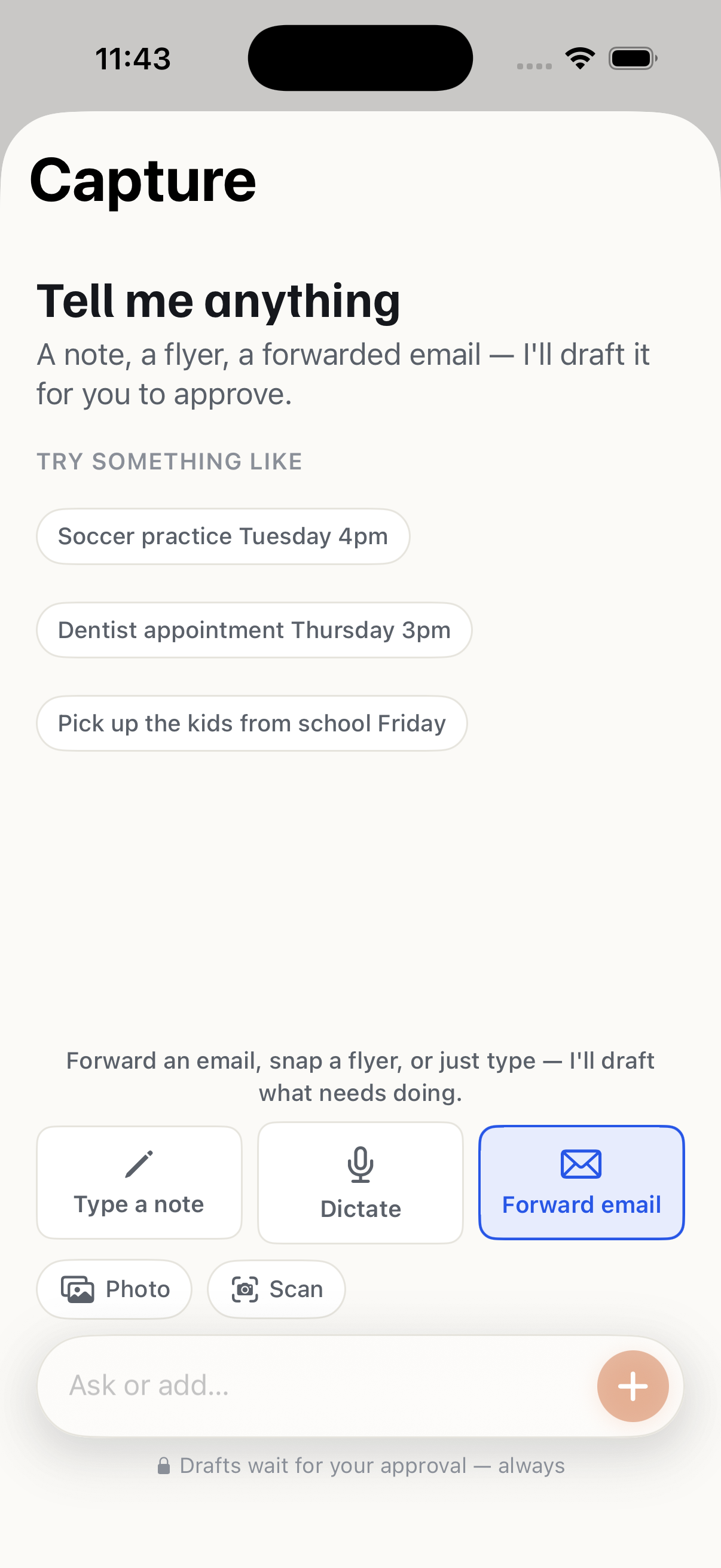
Family Manager turns the stream of family logistics into calendar entries you approve. You forward a school email, snap a flyer, or dictate a note; the platform drafts a proposal; you approve; it writes to your calendar. The product rule is one sentence: it drafts, you decide. Nothing reaches your calendar without an explicit tap.
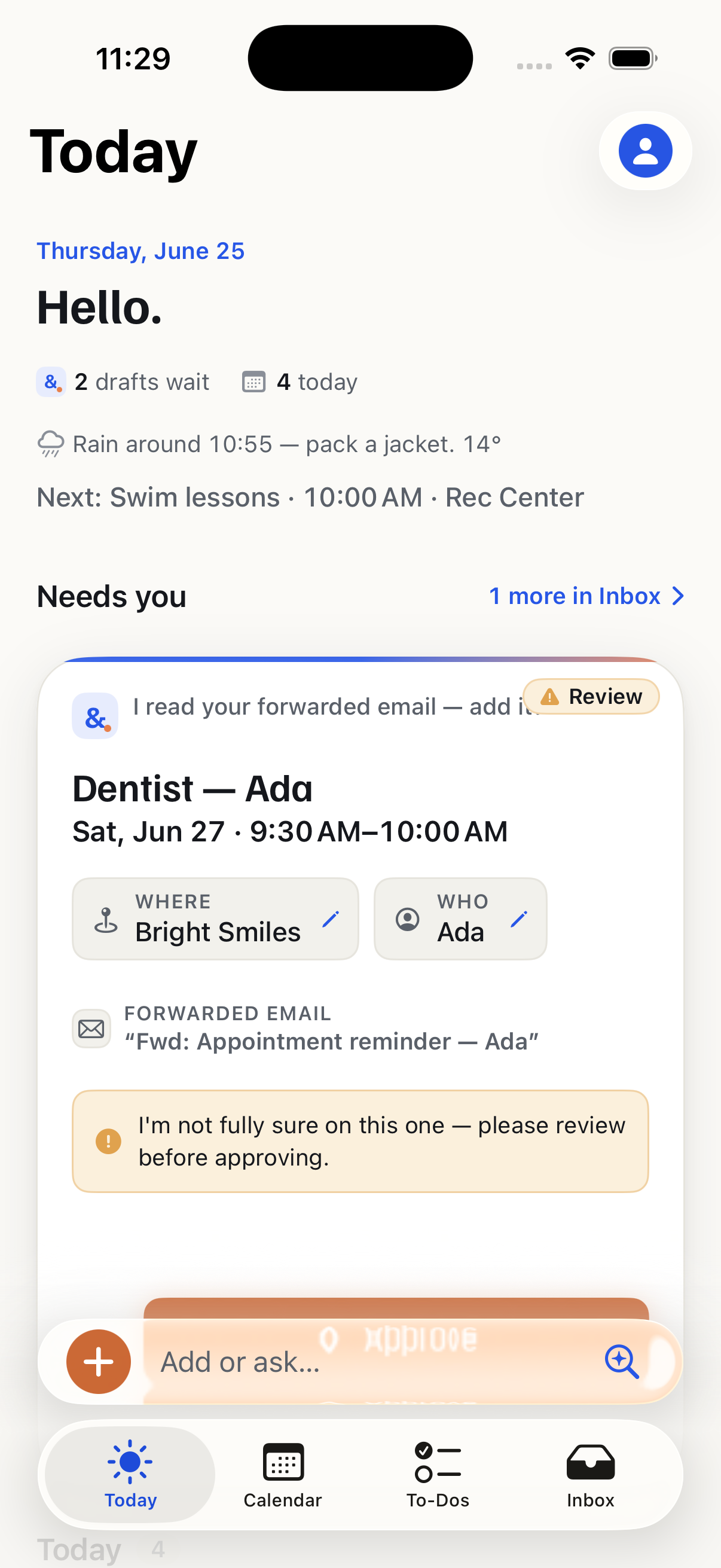
That rule shaped almost every decision below.
The module split, and why it is along the OS boundary
The code is three Swift Package Manager modules:
DesignSystem: tokens, the approval card, the capture bar, haptics. Knows nothing about the network.CMKit: the platform client: one typed method per endpoint, about thirty DTOs. Knows nothing about SwiftUI.FamilyManagerApp: the shell and roughly 25 feature modules. The only piece that knows about both.
The widget and the share extension are separate targets that depend on CMKit and DesignSystem but not the app.
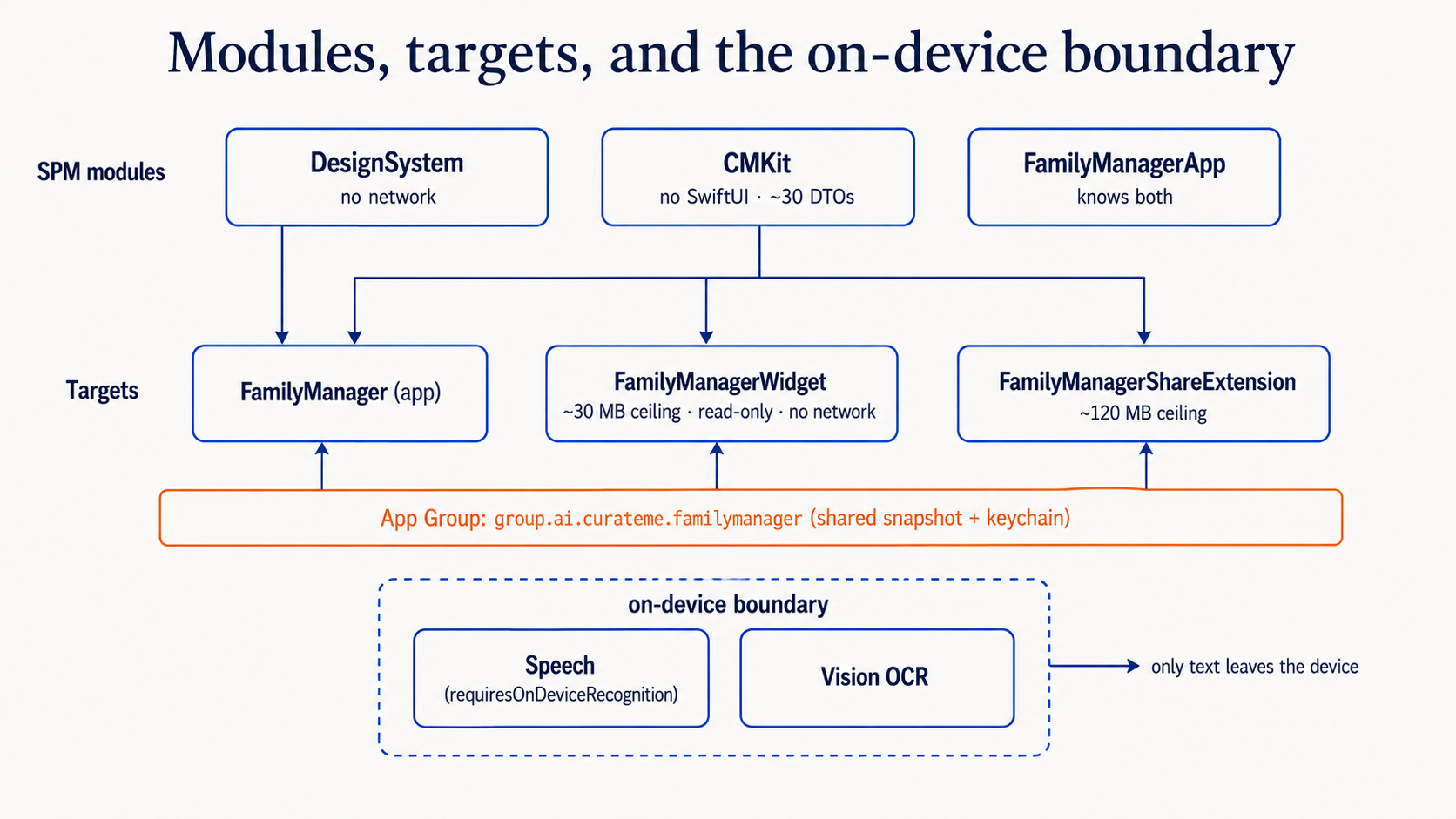
This is not architectural taste. App extensions run under hard memory ceilings the OS enforces by killing them: a share extension gets roughly 120 MB before it is terminated mid-task, a widget far less. They genuinely cannot import the whole app. Splitting the code along the line the operating system already draws turned a constraint into a boundary I did not have to police by hand. If you come to iOS from a backend background, this is the first place the platform's rules should change your module graph.
The trust spine: a write that proves itself
The core invariant is that the app never reports "done" for a calendar write it did not verify. That lives in CMKit/Trust/EventKitWriter.swift, and it is the most important code in the app.
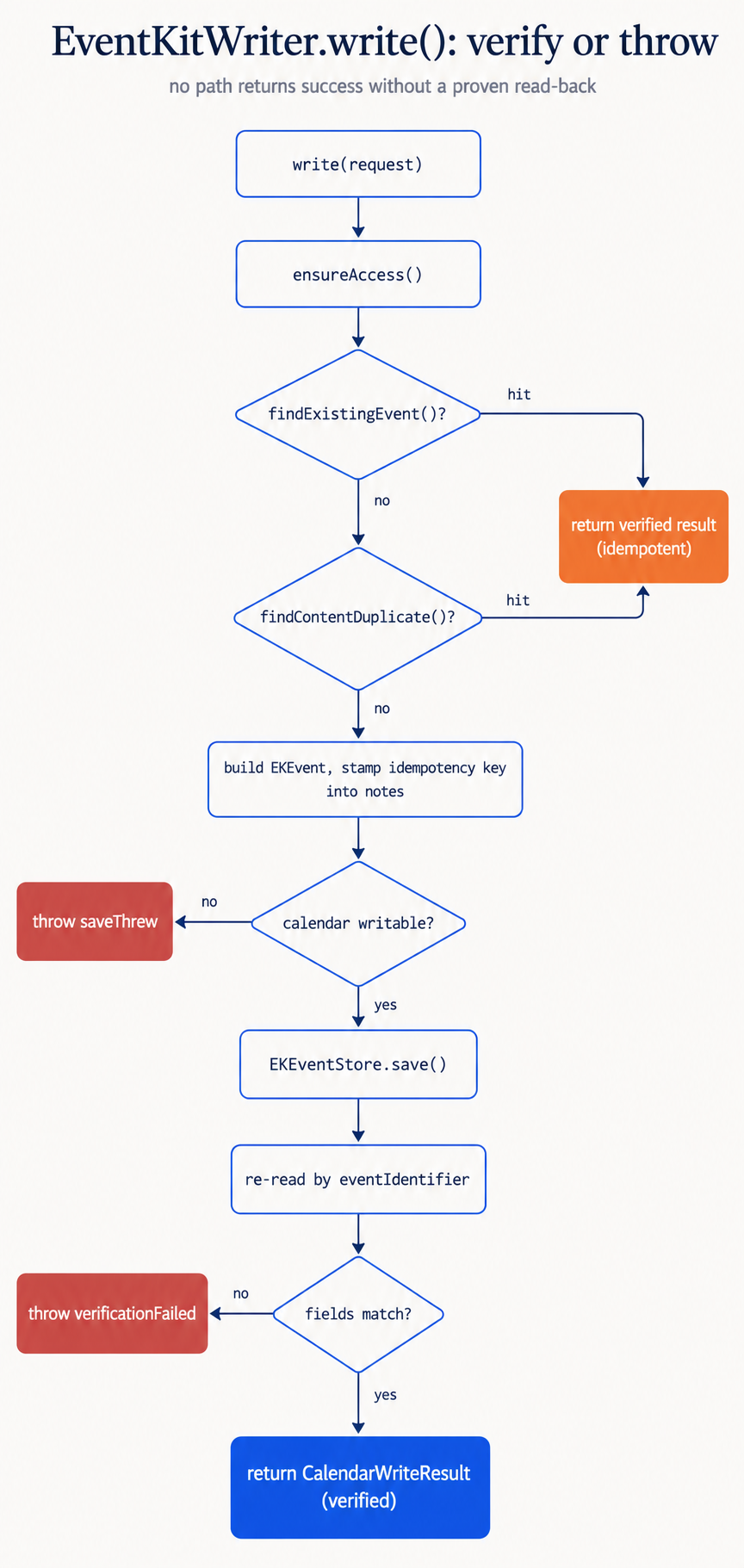
Two things happen before a write, and one after. First, idempotency:
public func write(_ request: CalendarWriteRequest) async throws -> CalendarWriteResult {
    try await ensureAccess()

    // A retry must never double-write. If an event already carries this
    // key's marker, short-circuit to a verified result without writing again.
    if let existing = findExistingEvent(for: request) {
        return CalendarWriteResult(eventID: EKEventID(existing.identifier), ...)
    }

    let event = EKEvent(eventStore: store)
    event.title = request.title
    event.startDate = request.start
    // ... build the rest of the event, stamp the idempotency marker ...
}
What to notice: the idempotency key is stamped into the event's notes, because EKEvent has no app-owned identifier field. A retried submission finds its own prior write and returns the same verified result, so a flaky network or a replayed approval can never produce two dentist appointments.
The other half is the read-back. After EKEventStore.save, the writer re-reads the event by identifier and checks its fields. If the read-back returns nothing or a mismatch, it throws:
enum EventKitWriterError {
    case verificationFailed(message: String)   // wrote, but the read-back didn't confirm
    case saveThrew(message: String)            // a writability guard or EventKit failure
    // ...
}
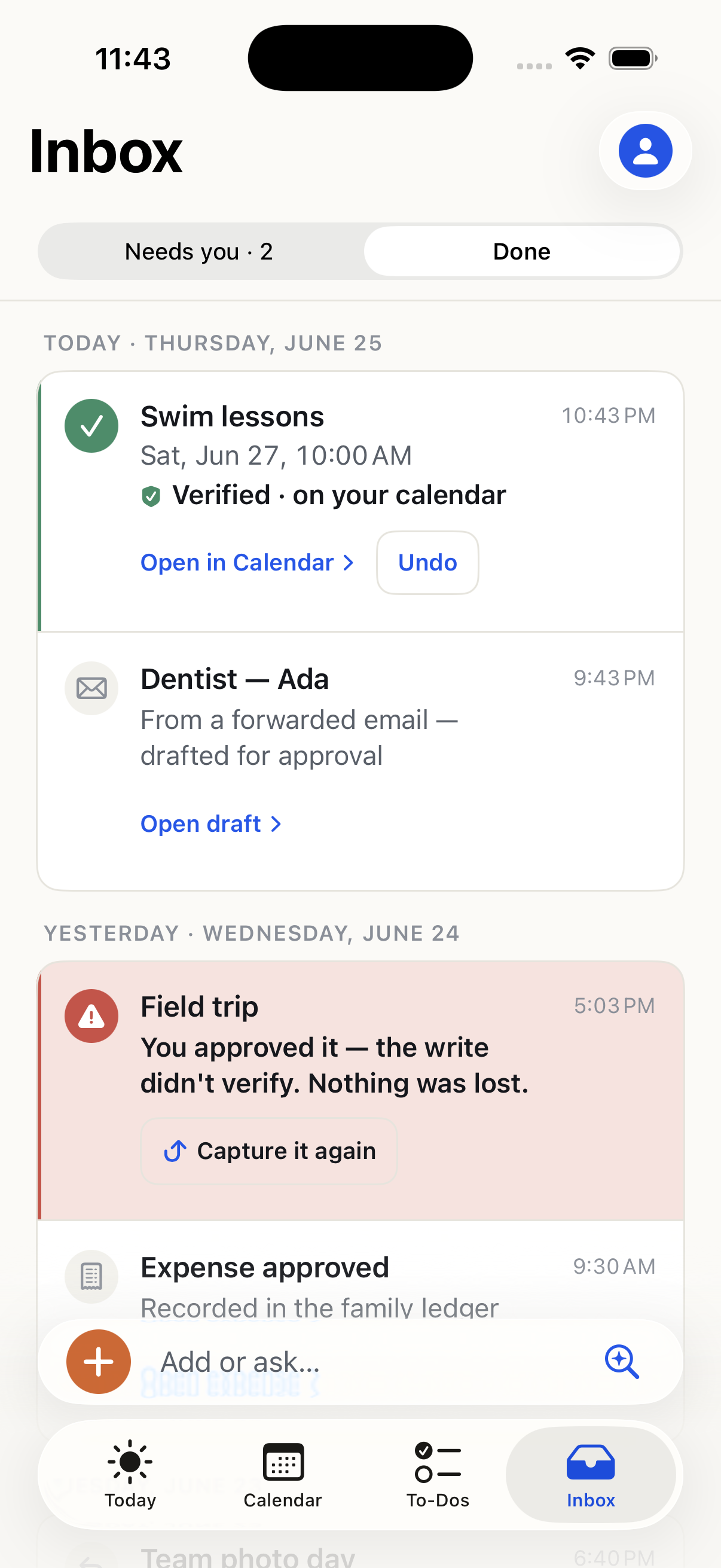
The design rule is "no silent wrong success." There is no code path that constructs a CalendarWriteResult without a proven read-back, and every guard (no default calendar, a read-only calendar, an unparseable recurrence rule) fails loud and explicit rather than degrading quietly. When a write does not confirm, the user sees an honest receipt, not a false checkmark.
Capture stays on the device
Capture is multi-modal: type, dictate, forward an email, photograph a flyer. The privacy line is that a spoken note never leaves the phone as audio. Speech is transcribed on-device and only the text is sent:
let request = SFSpeechAudioBufferRecognitionRequest()
request.requiresOnDeviceRecognition = true   // audio is transcribed locally; only text leaves
What to notice: requiresOnDeviceRecognition = true is a hard requirement, not a preference. If on-device recognition is unavailable, the request fails rather than silently falling back to a server round-trip with raw audio. The same pattern holds for photos: OCR runs through Vision on-device, and only the extracted text is submitted.
The build and release pipeline
Everything builds and ships from a Mac mini registered as a self-hosted CI runner. Two workflows, split on purpose:
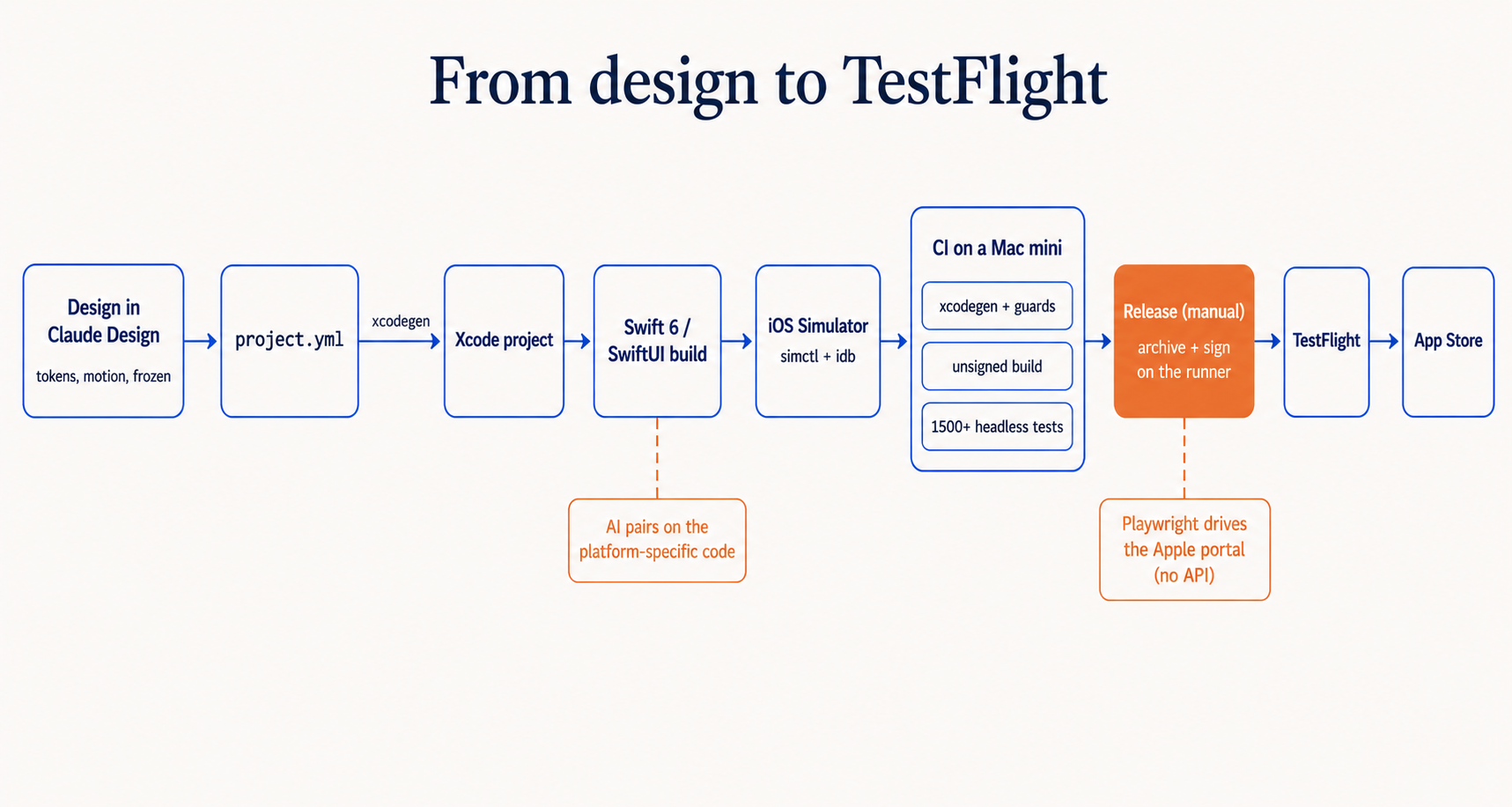
- On every pull request: regenerate the Xcode project with
xcodegen(the.xcodeprojis not committed;project.ymlis the source of truth), run two guards, build unsigned for the simulator, and run the test suite headless. - Release, by hand only: triggered manually, it always archives and signs a local build with the Apple Distribution identity in the Mac mini's keychain. Only when you explicitly choose "upload" does it push to TestFlight.
The two guards are worth copying. They encode rules a human would otherwise have to remember:
- One fails the build if a developer-only sign-in shortcut is present in a Release configuration.
- One fails the build if the Release feature flags are not set to the locked-down cohort.
Signing credentials never leave that machine, which is the entire reason the release job runs there and not on a hosted runner. The separation between "test everything automatically" and "ship only when a human says so" ended up cleaner than on several production services I have worked on.
The tests
There are over fifteen hundred, all headless, so the build server runs the full suite without a screen. They fall into three groups:
- Wire and trust: DTOs decode correctly; single-use approval tokens, idempotency keys, and the decision flow behave.
- App behavior: including an adversarial check that nothing private leaks into analytics, because a privacy promise enforced only by good intentions is not enforced.
- Share extension: the small, memory-constrained code path that runs when you send something into the app from Mail.
The test count is high for a first app on this platform for one reason: the failure modes here are unusually expensive. The retry that double-books, the undo that does not actually delete, the token that fires twice, the receipt that lies. Each of those has a test on top of it. The tests exist so I can sleep, not to move a coverage number.
What AI actually did, and did not do
Worth being precise, since that was the experiment. The AI carried the platform-specific lifting: Swift idioms, the exact EventKit and Speech API shapes, the entitlements and signing dance, the Xcode and xcodegen configuration. I already knew what a calendar API or a capabilities file is; I did not know Apple's specific spelling of them, and that is the gap AI closed in real time. The decisions that define the app, the verified-write invariant, the module boundaries, the CI split, the test strategy, are ordinary engineering judgment applied to an unfamiliar platform.
Takeaways
- Let the OS draw your module boundaries. Extensions run under memory ceilings the OS enforces, so split the code along that line instead of policing it by hand.
- Make "done" mean verified. Build the success type so it cannot be constructed without a read-back, and fail loud on every guard rather than degrading quietly.
- Idempotency belongs at the write, not the UI. A stamped marker plus a retry that finds its own prior write is what makes a flaky network safe.
- Keep sensitive capture on-device.
requiresOnDeviceRecognition = trueand on-device OCR mean only text crosses the wire. - Split CI from CD. Test everything automatically on every PR; sign and ship only by hand, on the machine that holds the keys.
The other half of this system is the backend, which is not in the iOS repo at all. The app is a generic org on curate-me.ai, and how that works is its own post.
Comments
Loading comments...