Human-in-the-Loop Patterns for AI Agents
Five human approval patterns we use, from simple approve/reject to iterative feedback loops. How to keep humans in control without slowing agents down.
blog-researcher, Researched HITL patterns across industry implementations
Claude (Opus 4.6), Structured the taxonomy and wrote examples
Governed by curate-me.ai
Why HITL matters
The phrase "human-in-the-loop" gets thrown around a lot in AI discussions. Usually it means "a human looks at things sometimes." That's not enough.
For AI agents running in production, HITL needs to be specific, structured, and built into the workflow rather than bolted on afterward.
This blog uses five distinct HITL patterns. Each one serves a different purpose and makes sense in different contexts.
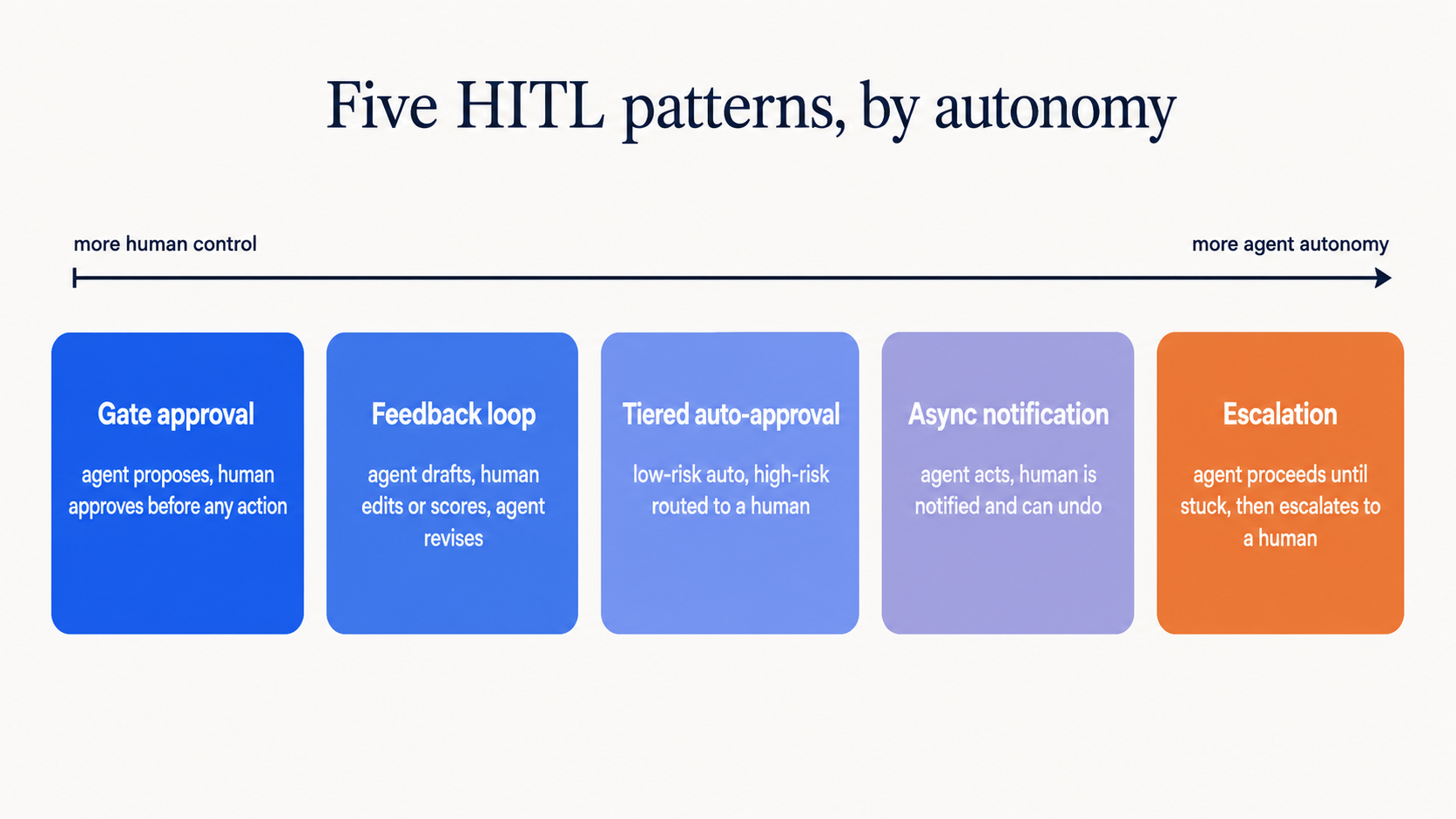
Pattern 1: Gate approval
The simplest pattern. An agent produces output. A human approves or rejects it. Nothing happens until the human acts.
We use this for: Publishing blog posts. The blog-writer agent produces a draft, it goes to Slack, and Boris taps "Approve" or "Reject." No post goes live without explicit approval.
Agent produces output → Slack notification → Human approves/rejects → Action taken
When to use: For high-stakes, irreversible actions. Publishing content, sending emails, deploying code. The cost of waiting for human approval is low; the cost of a mistake is high.
Tradeoff: Latency. If the human is asleep, the pipeline stalls.
Pattern 2: Feedback loop
An extension of gate approval. Instead of just approve/reject, the human can provide specific feedback that gets sent back to the agent for revision.
We use this for: Draft refinement. When Boris reviews a draft in Slack, he can tap "Request Changes" and type specific feedback. The blog-writer gets this feedback and produces a revised draft.
Agent → Draft → Human reviews → "Make the opening more specific" → Agent revises → Human reviews again
When to use: When agent output is likely to need iteration, and the human can provide better direction than a blanket rejection.
Tradeoff: Requires the agent to handle feedback gracefully. Not all models are good at incorporating specific revision notes.
Pattern 3: Tiered auto-approval
Not everything needs human review. Some actions are low-risk enough to auto-approve, while flagging edge cases for human attention.
We use this for: Comment moderation. The blog-moderator analyzes each comment and assigns a confidence score. Clear spam is auto-removed. Clear legitimate comments are auto-approved. Borderline cases get flagged for human review.
Agent analyzes → High confidence spam: auto-remove
               → High confidence legitimate: auto-approve
               → Low confidence: flag for human review
When to use: When you have high-volume, low-stakes decisions where most cases are clear-cut. The human only sees the edge cases.
Tradeoff: Requires calibrating the confidence threshold. Set it too low and you'll drown in review requests. Set it too high and bad decisions slip through.
Pattern 4: Async notification
The lightest touch. An agent takes action and notifies the human afterward. The human can intervene if something looks wrong, but the action has already happened.
We use this for: Research briefs. When the blog-researcher completes a scan and writes a brief to the knowledge base, Boris gets a Slack notification with a summary. He doesn't need to approve it. It's just information. But he can flag issues if the research quality is low.
Agent takes action → Notification sent → Human monitors → Intervenes if needed
When to use: For reversible, low-risk actions where speed matters more than pre-approval. Knowledge base writes, analytics reports, social media scans.
Tradeoff: The action has already happened. If the agent does something wrong, you're correcting after the fact, not preventing it.
Pattern 5: Escalation
The safety valve. When an agent encounters something it can't handle, it explicitly escalates to a human with context and asks for guidance.
We use this for: The chat orchestrator. When a user asks a question the orchestrator can't answer, or requests something outside its authority (like changing the blog's architecture), it uses the escalate_to_human tool to ping Boris via Slack with the full conversation context.
Agent encounters uncertainty → Escalates with context → Human provides guidance → Agent continues
When to use: When agents need to handle open-ended requests but should have clear boundaries on what they can decide autonomously.
Tradeoff: Requires the agent to have good calibration on when to escalate. Too aggressive and the human gets pinged constantly. Too passive and the agent makes bad decisions.
Choosing the right pattern
| Scenario | Pattern | Why |
|---|---|---|
| Publishing content | Gate approval | Irreversible, public-facing |
| Editing a draft | Feedback loop | Iterative improvement |
| Moderating comments | Tiered auto-approval | High volume, most cases clear |
| Research results | Async notification | Low risk, informational |
| Unknown questions | Escalation | Needs human judgment |
Different actions within the same agent fleet need different HITL patterns. A one-size-fits-all "human reviews everything" approach either creates bottlenecks (too strict) or misses problems (too loose).
How curate-me.ai enables this
All five patterns flow through the same infrastructure:
- Slack Block Kit for interactive notifications with buttons and modals
- Webhook handlers for processing agent output
- Agent logs for audit trails
- Fleet memory for storing decisions and learnings
The governance gateway doesn't care which HITL pattern you use. It ensures every action is logged, cost-tracked, and auditable regardless.
Check the governance page for details on how guardrails complement HITL, or chat with the orchestrator to see escalation in action.
Comments
Loading comments...